What is AGEMO?

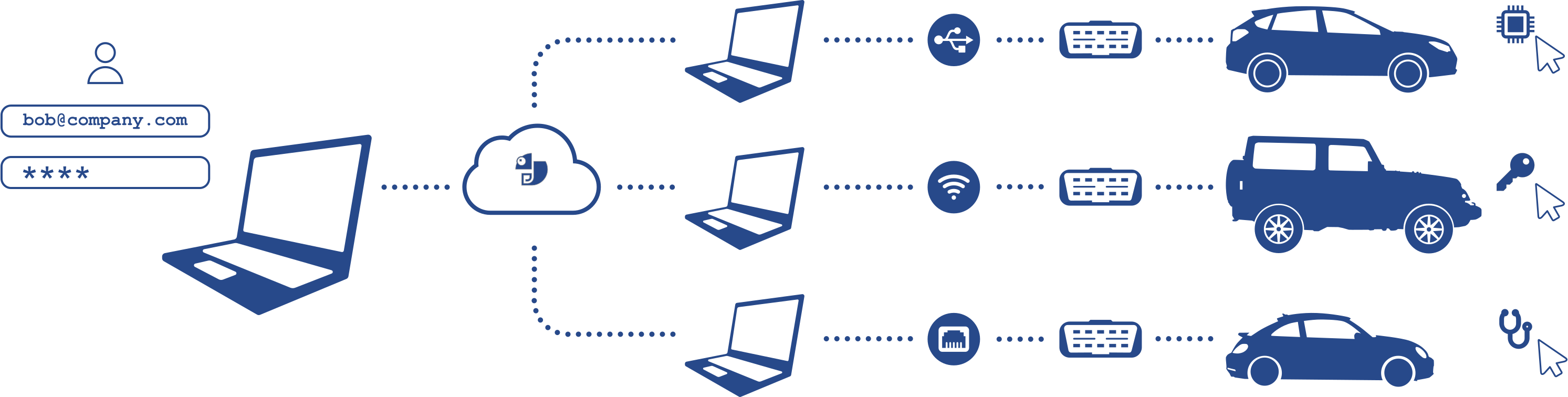
AGEMO is a platform that connects users, remote desktops and vehicles into a single automotive diagnostic workflow. From one web interface, you can access your environment, connect to an available remote desktop and run diagnostic and service functions.
Benefits for workshops

Remote diagnostic environments
Access diagnostic systems through connected remote desktops without installing multiple tools locally.
Advanced vehicle functions
Run diagnostic and service procedures using available tools and environments.
Less hardware complexity
Work with remote environments instead of maintaining multiple diagnostic setups.
Faster workflow
Access tools and run procedures quickly without switching between different systems.

How it works

AGEMO links your account, diagnostic tools and vehicles into a single workflow. Functions launched from the web platform are executed on the connected vehicle through your desktop agent and diagnostic interface.

How it works
● ○ ○ ○
Sign in
Open your AGEMO account and access your workspace.
● ● ○ ○
Choose a remote desktop
Select one of your online desktop agents linked to your AGEMO account.
● ● ● ○
Access tools and vehicle
Work with connected diagnostic tools and vehicle systems.
● ● ● ●
Run diagnostic
Launch diagnostic and service procedures directly from the platform.

Getting started

● ○ ○ ○ ○
Create your AGEMO account
Create your account to access the web platform and your personal diagnostic workspace. Your account provides access to your activity history, desktop agents, connected diagnostic equipment and personal settings, keeping everything organized in one place.
● ● ○ ○ ○
Download the AGEMO desktop agent
Download and install the desktop agent on the computer that will be used for diagnostics. The agent connects your diagnostic adapters and vehicle interfaces to the web platform. The agent does not require registration or binding to a specific machine. You can install agents on different computers or for different users, or use an existing agent shared with you by another user. See the next step to link an agent to your account.
● ● ● ○ ○
Link desktop agent to the account
To link a desktop agent to account, the agent requires a link code: a one-time token that you can generate in your workspace at any time. The token can be entered when the agent is first launched or later from the agent menu.

• After the code is used, the agent becomes linked to your account and appears in your list of available agents.
• The token cannot be reused. To link additional agents, generate a new token.
• You can remove an agent from account using your workspace or the desktop agent menu.
• The agent does not store any information about previous users. After unlinking, the agent is ready to be linked to any account.
● ● ● ● ○
Connect to the car
Select an agent from your list on the web platform (by default, the last agent you used is selected). The agent’s online status is displayed at the top of the page.
Select the available diagnostic adapter. The list of installed adapters is updated automatically when you select an agent.
Use this adapter to connect to the vehicle or module you are working with.
● ● ● ● ●
Run diagnostics
Once the agent and diagnostic adapter are selected and the vehicle is connected, you can start working with the system.
Run diagnostics, service procedures and other supported vehicle functions directly from the web platform.

Supported Diagnostic Adapters

Ethernet/Wi-Fi DoIP
A cost-effective solution for modern vehicle networks. Connect using an ENET(Ethernet-to-OBD2) cable through your laptop’s Ethernet port, or use a Wi-Fi DoIP adapter for wireless communication.
J2534 PassThru
Use a wide range of diagnostic adapters that support the J2534 PassThru interface. Depending on the vehicle, you can choose the most suitable device or continue working with the adapter you already use.
Canable
A low-cost solution for connecting to CAN interfaces when working with individual vehicle modules on the bench.

Still have questions?

Contact Us
Our team can help you set up AGEMO, choose the right diagnostic adapters and answer any questions about the platform.
FAQs
Find answers to common questions about AGEMO, supported adapters and how to start working with the platform.